
AI Automation for Small Business: Practical Examples and How to Get Started
AI Automation for Small Business: Practical Examples and How to Get Started

What Is AI Automation for a Small Business?
AI automation for a small business means adding artificial intelligence (AI) to a repeatable business process. Instead of asking employees to read, sort, and respond to every incoming request manually, a company can use AI to understand messages, extract important details, and prepare replies for review. The goal is to reduce routine work and give a small team more time for customers and decisions that need human attention.
Not every automated task needs AI. Sending a booking reminder at a fixed time is a straightforward example of rule-based automation. Understanding an email written in a customer's own words is different: AI can help interpret the request and decide how to categorize it. Combining AI with ordinary software allows businesses to handle less predictable information without giving up control over important actions.
How Does a Simple AI Automation Workflow Work?
An AI automation workflow is a sequence of connected steps that starts when something happens, such as receiving an email or submitting a form. AI handles tasks that require interpreting information or generating text, while ordinary software manages predictable actions such as routing messages and updating records.
Imagine a small retailer receives this customer email: "Can you move my delivery to Friday?" A simple workflow could handle the request as follows:
- Trigger: The customer's email arrives and starts the workflow automatically.
- AI interpretation: AI identifies the request as a delivery-date change and extracts the requested day.
- Rule-based action: The software routes the request to the appropriate employee, retrieves relevant information from connected systems, and uses AI to prepare a draft response based on approved information.
- Human review: An employee checks whether the requested date is available, reviews the draft, and approves any commitment made to the customer.
- Outcome: The approved response is sent, and the request and its final status are recorded.
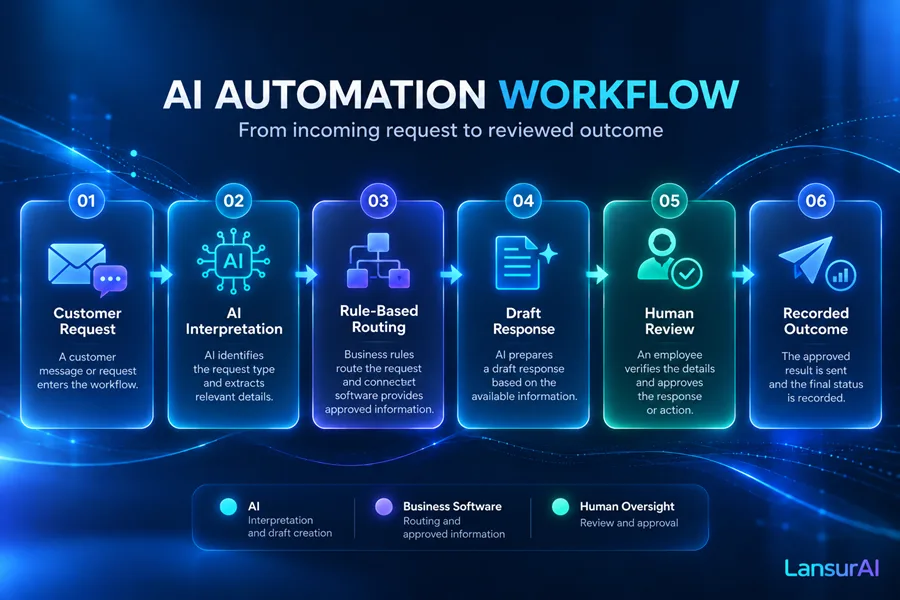
The important distinction is that AI does not control the entire process. It helps interpret the customer's message and prepare a response, but it cannot reliably confirm delivery availability without accurate information from the business. The surrounding software and human review keep the workflow predictable and accountable.
Many useful AI automations follow this pattern. They do not require an autonomous AI agent that independently plans and executes complex tasks.
Five Practical AI Automation Examples for Small Businesses
AI automation can help with everyday tasks across sales, customer support, finance, marketing, and business operations. The best starting point depends on how your team works, which tools it already uses, and how easily employees can check the results.
The following five examples are illustrative workflows, not documented customer implementations. Each shows where AI could add value to an existing process without requiring a business to build an entire software system from scratch.
Example 1 — Capture Leads and Prepare Follow-Ups
Imagine a small service agency receiving inquiries through its website and email. While the owner is meeting clients or completing projects, new requests accumulate in the inbox. Responding to each inquiry means reading the message, identifying what the customer needs, recording the details, and writing a reply.
An AI-powered workflow could simplify this process. When a new inquiry arrives, AI identifies the requested service, extracts relevant details, and notes missing information. The workflow then creates a lead in an existing spreadsheet or customer relationship management (CRM) system. AI prepares a personalized follow-up draft, which a team member reviews before sending.
AI is particularly useful when customers describe their needs in different ways. Copying structured form fields into a spreadsheet would not require AI, but interpreting free-form messages and drafting relevant questions may benefit from it.
What to measure: Time to the first useful response and the percentage of inquiries categorized correctly.
What to watch: AI should not promise prices, availability, delivery dates, or contract terms without human approval. A small team can begin with draft responses rather than automatic sending.
Example 2 — Sort Customer Requests and Draft Support Replies
A small online store might receive questions about order status, delivery problems, returns, and product availability in one shared inbox. Employees spend time reading each message, finding the relevant information, and deciding who should respond.
An AI automation workflow can classify incoming messages by topic and urgency. Connected software can then retrieve authorized order information or approved answers to frequently asked questions. Based on that information, AI prepares a draft reply or recommends passing the request to the appropriate employee. The workflow records the status of the request so the team can track what remains unresolved.
The AI contribution is understanding customer intent and drafting responses based on available information. The actual order status and return policy must come from trusted business records, not from AI-generated assumptions.
For a small team, the first version might only sort messages and suggest replies. Connecting order systems and handling exceptions automatically can require more integration work.
What to measure: Time spent sorting requests, accuracy of routing, and how often requests need escalation or correction.
What to watch: Complaints, refunds, disputed orders, and questions without reliable answers should be escalated to a person. AI must not invent policies or make unauthorized commitments.
Example 3 — Extract Data From Supplier Invoices and Receipts
Consider a business owner or bookkeeper who regularly receives supplier invoices as PDF files, scanned documents, or email attachments. Entering supplier names, invoice dates, amounts, and line items into accounting records takes time, especially when documents have different layouts.
An AI-assisted workflow could process each incoming document and extract the relevant fields. Conventional software then checks for required information, validates calculations using defined rules, and looks for possible duplicate invoices. If the checks pass, the workflow creates a draft accounting entry for review.
AI helps interpret documents with varying formats. However, calculations, accounting rules, and payment authorization should remain controlled by reliable software and responsible employees.
The employee verifies the extracted information, confirms the supplier's identity, and corrects any mistakes before posting the entry. Payment approval remains a separate authorized action.
What to measure: Document handling time, the number of corrections required during review, and how frequently documents need manual processing.
What to watch: Incorrect amounts, missing fields, duplicate invoices, and sensitive financial information. This workflow may require more careful setup than simple message classification, particularly when accounting-system integrations and access permissions are involved.
Example 4 — Repurpose Approved Marketing Content Into Draft Posts
A small marketing team may publish a blog article, product announcement, or company update and then need shorter versions for social media, newsletters, and other channels. Preparing each version manually can consume time that could be spent planning campaigns or working with customers.
An AI-powered workflow can take an approved source document and create several drafts adapted to different channels. For example, it could turn a product announcement into a short social post, an email introduction, and a concise newsletter summary.
AI handles summarization, rewriting, and tone adaptation. The source document remains the reference for product features, prices, and factual claims. Drafts are placed in a review queue, where a marketer checks accuracy, wording, brand consistency, and publishing rights before scheduling them.
This can be a relatively accessible starting point because the process may work with existing documents and publishing tools, without complex access to financial or customer systems.
What to measure: Time spent preparing and editing content, and the percentage of drafts accepted with little or no revision.
What to watch: Invented product details, misleading claims, inconsistent brand voice, and potential copyright issues. Content should be approved before publication.
Example 5 — Prepare a Weekly Business Summary for Review
A business owner often needs a weekly overview of sales, customer support activity, and unfinished work. The relevant information may be spread across spreadsheets, a CRM system, and task management tools. Collecting it and writing a useful summary can become another recurring administrative task.
An AI automation workflow could begin with scheduled data exports from these systems. Conventional software calculates totals and other defined metrics from the available records. AI then turns the verified information into a readable summary, highlights notable changes, and suggests questions that may deserve further investigation.
For example, AI might flag an increase in unresolved support requests and suggest checking whether a particular category is responsible. It should not invent an explanation or present a suspected cause as a confirmed fact.
The owner reviews the figures and conclusions before sharing the report. Wherever possible, the summary should reference the underlying records so that important statements can be checked.
What to measure: Time spent preparing the weekly report and the number of factual or numerical corrections required during review.
What to watch: Missing records, outdated information, inconsistent metrics, and unsupported explanations. If the source data is unreliable, automating its summary will not solve that problem. Integrating several business systems can also make this workflow more demanding to maintain.
Which AI Automation Should You Start With?
The best first automation is not necessarily the most advanced one. For a small business, it is usually better to start with a repetitive task that takes noticeable staff time, has clear inputs and outputs, and can be checked before mistakes affect customers or finances.
Consider these questions when evaluating a process:
- How often does it happen? A task repeated daily or weekly offers more opportunities to reduce manual effort than an occasional activity.
- Does it require AI? If the task follows predictable rules, ordinary automation may be simpler and more reliable. AI becomes useful when employees need to interpret varied messages, documents, or other unstructured information.
- Is the information already digital? Processes involving existing emails, spreadsheets, or connected business applications are generally easier to explore than tasks that require entirely new data collection.
- What happens if something goes wrong? Drafting a marketing post is different from approving a supplier payment. The consequences of errors should influence which workflow you choose first.
- Can someone review the result? A clear approval step makes it easier to test automation without immediately handing over important decisions.
For example, automatically copying standard contact-form fields into a spreadsheet may only require a rule-based workflow. If customers send free-text inquiries that need interpretation, adding AI could make sense.
A microbusiness might begin with AI-generated drafts that its owner checks manually. A growing company may benefit from more extensive integrations, but will also need clear responsibilities and access controls.
A practical starting rule: Choose one frequent, time-consuming, low-risk task with results that are easy to verify. Avoid automating an entire department before demonstrating value in one manageable process.
How to Start Without a Large Technical Project
Getting started with AI automation does not necessarily require building custom software. Some existing business applications offer automation features, while no-code and low-code platforms can connect tools and introduce AI into workflows. However, integration requirements, data security, and unusual business rules can still require technical assistance.
A small business can approach its first automation in five steps:
- Choose one repetitive task. Identify an activity that regularly interrupts employees or requires substantial manual handling. Start with a narrow part of the process rather than attempting to automate everything.
- Document the current workflow. Write down what triggers the task, what information employees receive, what they do with it, and what a correct result looks like. Identify decisions that must remain with a person.
- Check your existing tools. Find out whether your email, spreadsheet, CRM, or other business application supports the necessary connections. Check data-access permissions and whether a simpler rule-based automation would be sufficient.
- Run a small pilot with human approval. Test the workflow using representative, appropriately protected business data. Compare the outputs with what employees would normally produce, record mistakes, and keep manual handling available when automation fails.
- Measure the results before expanding. Compare handling time, correction effort, operating costs, and output quality with the original process. If the automation produces reliable value, consider extending it gradually.
The goal of the first pilot is not to eliminate human involvement. It is to establish whether the workflow can handle a useful portion of repetitive work accurately enough to justify its ongoing cost.
If employees spend more time correcting AI outputs than the workflow saves, simplify the process, improve its inputs, or reconsider whether AI is necessary.
What Will It Cost, and What Could Go Wrong?
AI automation can be relatively straightforward to test, but its real cost goes beyond an AI subscription. A small business should evaluate the full expense of implementing, operating, and supervising the workflow.
The main cost categories include:
- Platform subscriptions: Fees for automation platforms or software that manages the workflow.
- AI usage: Charges based on the AI service, usage volume, or features included in a subscription.
- Connected applications: Additional plans or features that may be required to access existing business systems.
- Initial setup and integration: Time or external assistance needed to configure connections, permissions, business rules, and testing.
- Human review: Employee time spent checking drafts, correcting errors, and handling exceptions.
- Monitoring and maintenance: Ongoing work to identify failures, adjust workflows, and respond when connected services or business requirements change.
A useful evaluation compares these costs with the manual work the automation could realistically reduce. For a low-volume task, continuing to handle it manually may be cheaper and more practical.
Risks to Consider
Even a well-designed workflow can produce incorrect results or fail when connected systems change. Important risks include:
- Incorrect AI outputs: AI may misunderstand a message, extract the wrong amount from an invoice, or generate a convincing but inaccurate answer. Important outputs need validation and an appropriate review process.
- Privacy and access: Customer records, financial documents, and other sensitive information should only be shared with authorized systems and services. Check what data is transferred, who can access it, and how it is handled.
- Integration failures: Connections may stop working, source data may be unavailable, or records may fail to update. The business needs a way to detect failures and process affected tasks manually.
- Unclear responsibility: Employees must know who reviews outputs, handles exceptions, and maintains the workflow. Customer commitments, payments, and other consequential decisions should remain under appropriate human authority.
A successful pilot should test these failure conditions as well as normal operations. Recording errors, checking outcomes, and maintaining a manual fallback are part of operating the workflow, not optional extras. These safeguards reflect the NIST AI Risk Management Framework's emphasis on testing, ongoing monitoring, and documented responsibilities.
The business case is simple: AI automation is worthwhile when its measurable operational benefit justifies its total cost and risk. The technology itself is not the result — a more effective business process is.
Key Takeaways
AI automation can help small businesses reduce repetitive work, but the best results come from choosing the right process rather than adopting the most advanced technology.
- Use AI where it adds value. AI is useful for interpreting messages, extracting information, summarizing data, and preparing drafts. Predictable tasks often need only simple rule-based automation.
- Start with one manageable workflow. Choose a frequent, time-consuming task with clear results and limited risk instead of attempting to automate multiple business processes at once.
- Keep people responsible for important decisions. Customer commitments, financial actions, sensitive information, and unusual cases require appropriate safeguards and human oversight.
- Measure the actual benefit. Compare handling time, output quality, correction effort, and operating costs before expanding an automation.
- Consider the full cost. Subscriptions, integrations, human review, and ongoing maintenance all affect whether an AI workflow makes business sense.
For a small business, the most useful first step is simple: identify one routine task, test a controlled automation, and expand only when the results justify it.